WORKFLOW MODELS IN N8N
A collection of real-world workflows you can actually apply. Keep in mind that these are the main workflows — getting them to run will require a few smaller supporting workflows, like Meta auth via Cloudflare (just 2 nodes, your AI Persona will help you set it up), Discord auth (also 2 nodes with Cloudflare)… The simple ones like these I won’t be posting here because they take only a few minutes to set up.
On top of that, for all your Google Sheets, YouTube, Supabase, Redis… connections — set up the credentials in n8n ahead of time so they’re ready to use whenever you need them. Avoid hardcoding tokens directly into nodes since you’d have to re-enter them every time. Run through the credential setup process a few times and you’ll find it’s actually very straightforward.

AI Agent for sales consultation on Meta Messenger
Identical to the website AI Agent — the only difference is that the Webhook and Respond nodes use the Meta API instead of a standard webhook. All the consultation logic, order closing, credit checking, and product lookup stays exactly the same.

AI Agent for sales consultation on a website or other platforms
The full AI Agent workflow covered in the previous section — Webhook receives the message, AI Agent processes it with Redis Memory and lookup Tools, Code node formats the output, Respond sends it back to the originating platform. Can connect to any platform that supports HTTP requests.

AI Agent for automated video rendering & approval
The workflow automatically checks video information in a sheet — source video links, background music, images — compiles everything and uses Creatomate to render. Once rendered, the video gets pushed into Discord for a human to approve or reject. Approve means it gets saved automatically to Google Drive; reject triggers a re-render. This one will definitely need a few supporting workflows alongside it, hahaha.
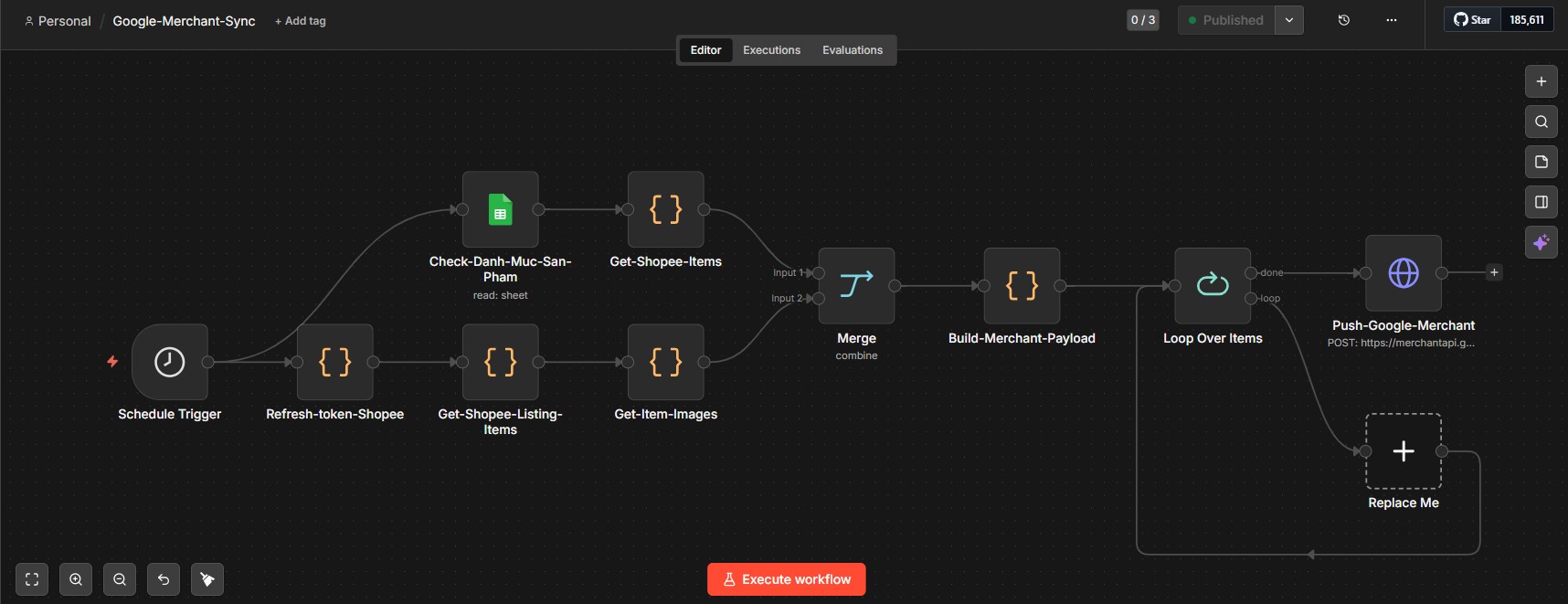
Sync products to Google Merchant
The rescue plan for websites built with JS so tangled that Google can’t find them — instead of waiting for Google to crawl on its own, the workflow proactively pushes all product data directly to Google Merchant Center. Within 10–14 days, Google will have indexed every product on that site.

Auto-reply comments on YouTube
Runs on a schedule, scans all videos on the channel, fetches new comments, uses AI to generate appropriate replies and posts them automatically. No comment gets left unanswered no matter how many videos the channel has.

Auto-sync products to Meta Catalog
Automatically updates prices and stock levels from Supabase to Meta Catalog on a schedule. Products on Meta always show the correct price and stock without any manual intervention.

Auto-sync price & stock to Shopee & TikTok Shop
Reads the product catalog from Google Sheets, filters price and stock data, pushes in parallel to Shopee, TikTok Shop, and Supabase on a schedule. Mall accounts only — regular shops will have to update manually, haha.
Good luck and success with Automation.
Duy Louis.